My Keychain
Personalized Double-Sided Message Keychain
5.0 / 5.0
(8) 8 total reviews
Couldn't load pickup availability
Turn meaningful words into a keepsake you can carry every day. Our Personalized Double-Sided Message Keychain lets you create a custom message on both sides, making it perfect for names, dates, short quotes, reminders, or words shared with someone special.
Whether it’s a message for your partner, family member, best friend, or yourself, each keychain is personalized to make your everyday essentials a little more meaningful.
Product Details
- Personalized text on both sides
- Customize Front and Back separately
- Up to 3 lines of text per side
- Maximum 15 characters per line
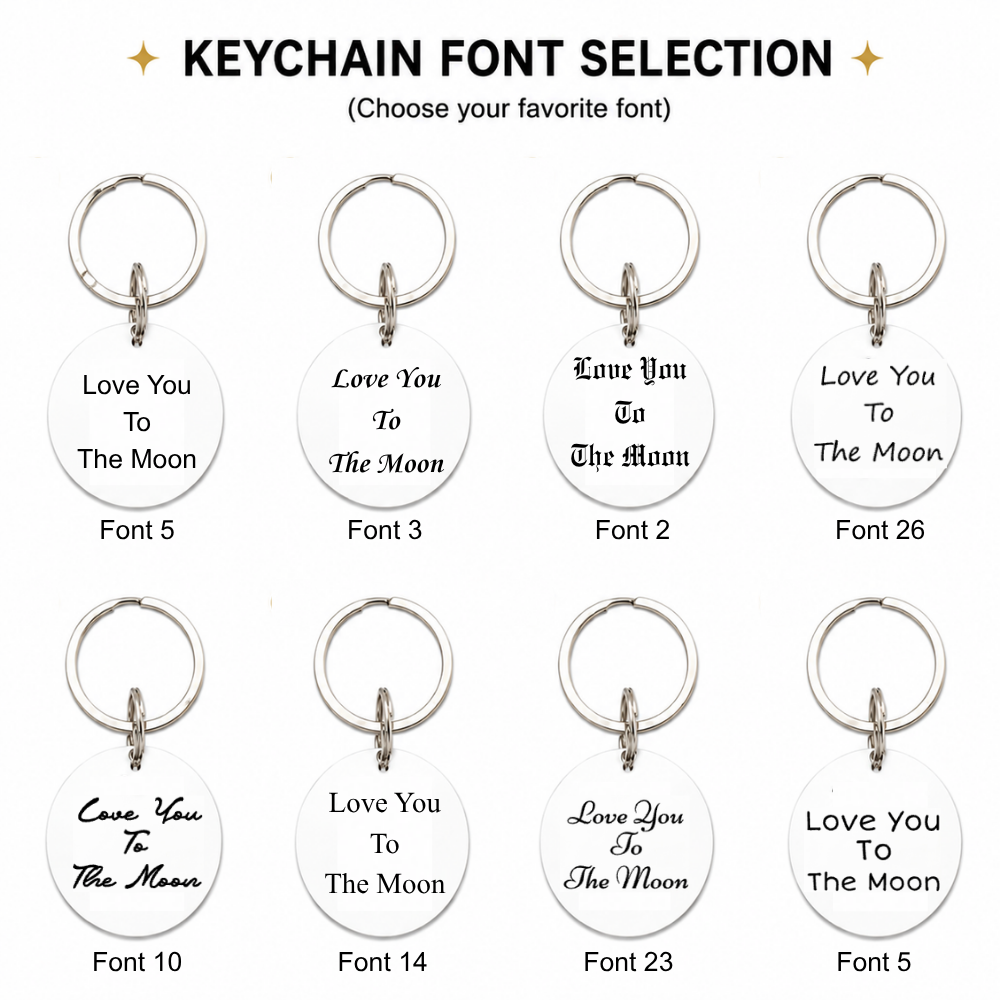
- Choose your preferred font style
- Classic round charm design
- Durable metal key ring
- Compact and lightweight
- Perfect for keys, bags and backpacks
- Thoughtful personalized gift for any occasion
- Customization Limits
- This keychain has 2 customizable sides: Front and Back.Each side supports:
- Maximum 3 lines
- Maximum 15 characters per line
- That means you can personalize up to 6 individual lines across the entire keychain.
- Please keep each line within the 15-character limit. Spaces and punctuation may count as characters.
- Example:
- FRONT
Line 1: Love
Line 2: You
Line 3: To - BACK
Line 1: The
Line 2: Moon
Line 3: <3
- FRONT
- Shorter text is recommended for a cleaner, easier-to-read result.
How to Send Your Customization
- Step 1 — Place Your Order
Purchase your Personalized Double-Sided Message Keychain and complete checkout. - Step 2 — Log In
Sign in to your MyKeyChain account after completing your purchase. - Step 3 — Find Your Order ID
Go to Orders, open your order and copy your Order ID. - Step 4 — Send Your Customization
Open the chat box in the bottom-right corner of our website and send your Order ID + Front text + Back text + Font choice. - For example:
- Front
Line 1: Love
Line 2: You
Line 3: To - Back
Line 1: The
Line 2: Moon
Line 3: <3 - Font: Font 11
- Front
- Please clearly separate each line so our team can understand exactly how you would like your personalization arranged.
- Step 5 — Wait for Confirmation
Our team will review your text, font selection and layout before confirming your customization request. Your personalized keychain will be prepared after the details have been confirmed.
Important Customization Notes
Please double-check all spelling, capitalization, dates and punctuation before submitting your customization.
Longer text may appear smaller to fit the available engraving area. For the cleanest result, we recommend using short words or phrases whenever possible.
Your Words, Always Close
From a simple “I Love You” to a meaningful date or private message, create a personalized keepsake filled with words that matter to you.
Share

A MEMORY THAT STAYS WITH YOU
Turn a favorite family moment into a personalized keepsake you can carry close, every single day.
A GIFT MADE FROM MEMORIES
Turn a favorite photo into a meaningful keepsake, thoughtfully personalized for someone you love.
MADE TO HOLD YOUR MEMORIES
Crafted from durable 3mm acrylic, this lightweight personalized keychain turns your favorite photo into a meaningful everyday keepsake.
A MEMORY MADE JUST FOR YOU
Turn a favorite photo into a personalized keepsake filled with meaning—perfect for celebrating family, loved ones, pets, and moments worth remembering.
LOVE, CARRIED WITH YOU
HOW TO PERSONALIZE YOUR KEYCHAIN
-
Step 1 — Place Your Order
Purchase the personalized keychain you’d like to customize.
-
Step 2 — Log In
Sign in to your MyKeyChain account after completing your purchase.
-
Step 3 — Find Your Order ID
Go to Orders, open your order, and copy your Order ID.
-
Step 4 — Send Your Customization
Open the chat box in the bottom-right corner and send your Order ID + photo(s) + customization details.
-
Step 5 — Wait for Confirmation
Wait for MyKeyChain to review and confirm your customization request before your order is prepared.
FAQ
How do I personalize my keychain?
Place your order, log in to your MyKeyChain account, find your Order ID under Orders, then use the chat box in the bottom-right corner to send your Order ID, photo(s), text, font choice, and any other customization details.
How do I send my photo after ordering?
Open the chat box in the bottom-right corner of our website and send your Order ID together with your photo(s). Please use the highest-quality original image available.
What type of photo works best?
Clear, bright, high-resolution photos work best. Make sure the main person, pet, or subject is clearly visible and avoid blurry, heavily filtered, or tightly cropped images.
Can I use different photos on double-sided keychains?
Yes. For eligible double-sided products, you can request the same photo on both sides or a different photo for the front and back. Clearly label each image when submitting your request.
Can I personalize my keychain with text?
Yes, selected products support custom names, dates, messages, or other text. Available character limits and layout options vary by product, so please check the individual product description before ordering.
Can I choose a font for my custom text?
Yes, when font options are shown on the product page, simply include your preferred font number with your customization request.